Pawsa
Screen-time budgeting, not screen-time bans.
Concept + system design · iOS · In progress

The short version
Most screen-time apps work like telling a heavy smoker to quit cold turkey: strict limits, no learning, and people give up within days. Pawsa treats screen time like a calorie deficit. It reads your real usage, suggests a budget, and steps it down gradually, with a companion to keep you going. I interviewed 10 people, then designed 30 features and mapped every dependency between them before writing app code.
- Role
- Solo: research, product, system design
- Timeline
- September 15, 2026 – present
- Outcome
- 30 locked feature specs and a 387-connection dependency map. No app code yet.
The problem
I was the user. Six hours a day, all doom-scrolling. None of it was for school. Even my "work" scrolling, checking competitors for RivalFed, ended up as Instagram. I was losing focus and pushing schoolwork back until everything piled up.
I tried the usual fixes. With iPhone Screen Time limits, I kept tapping "Ignore limit for today" until I gave up. Brick makes you carry a physical object around, and like Opal, it only blocks apps. It doesn’t help you use your phone less.
Cold turkey fails.
So I tried my own calorie deficit: a fixed 25 minutes less every week, not a percentage.
About 10 weeks later I was down to about 2 hours a day. It worked.
Then I stopped tracking, and it crept back. Today I’m at about 6½ hours, past where I started.
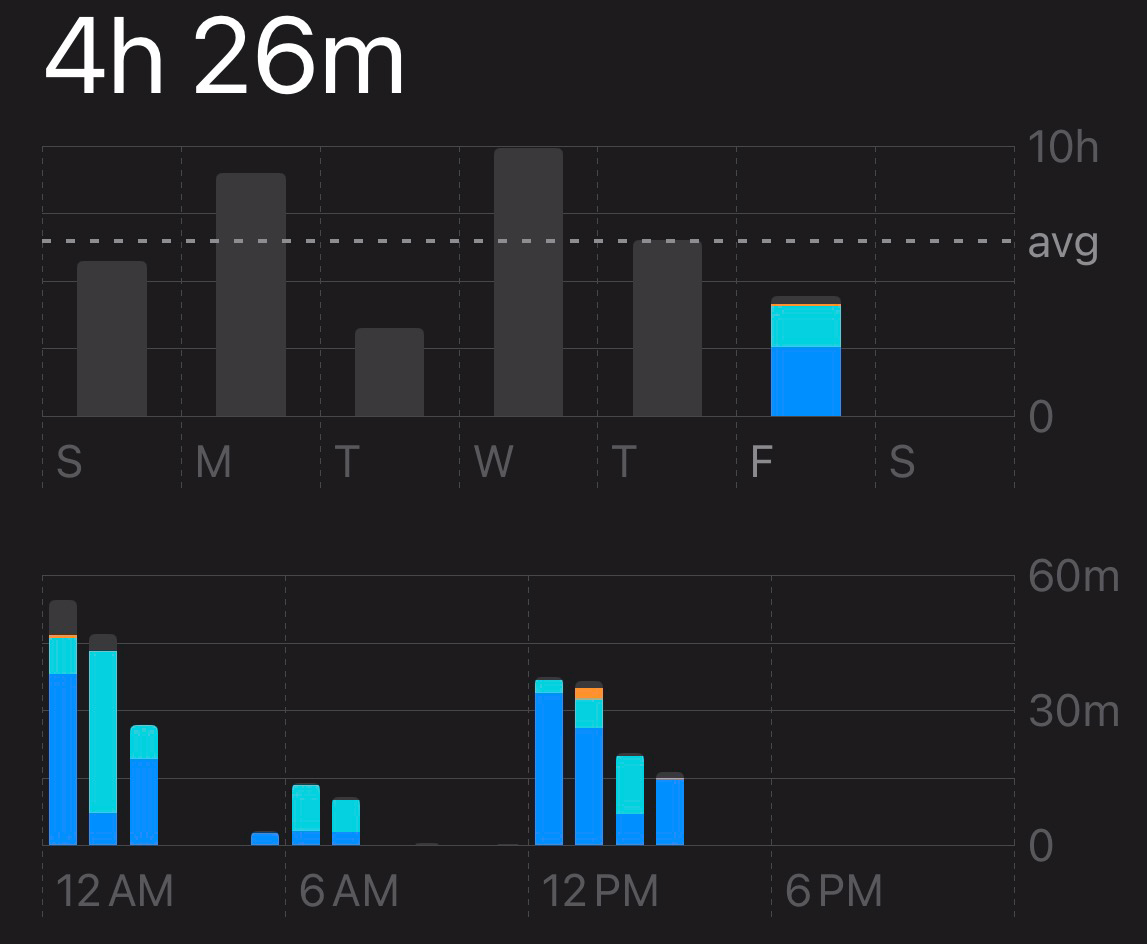
Before building anything, I wanted to know if other people were stuck in the same loop.
Listening
These weren’t formal interviews. When a coworker looked tired, I’d ask what happened last night. One answer: "Slept at 3, shift at 9, I was scrolling and lost track of time."
Then we’d pull up our Screen Time side by side. Mine was bad too, so nobody felt guilty showing theirs. Then I’d ask what they’d tried.
I also tried posting on Reddit, but the post was removed.
- People
- 10 coworkers and friends
- Method
- What happened, not what they’d do
- What I asked
- What happened last night, then what they’d tried
- What I heard
- People who’d tried blocker apps quit, especially the ones that need a physical object
- What surprised me
- One person averaged 12 hours a day, and none of it was work: games and TikTok
The insight
Cutting 25 minutes a week worked for me because I fill the time with soccer, the gym, and walks. Most people don’t have that. So Pawsa does the cutting for you, in 3% steps small enough that you barely notice.
The companion came from my coworkers. They kept talking about plushies, cats, anything cute. Around the same time, AI apps started giving their tools cute characters. My bet: people stick with things they find cute. So the shield shows Tofu, not a plain block screen. It’s a bet, not a result yet, and novelty wearing off is one of the risks I track.
How Pawsa works
Skip the walkthrough ↓Concept: built from Pawsa’s specs. The app isn’t built yet.
- Phone: Example: 14 days of Instagram use, about 2 hours 12 minutes a day; Pawsa suggests a 2 hour budget.
Step 1 of 5: I start by reading your last two weeks.
WhyThe median ignores binge days; the first budget is 90% of it.
- Phone: Instagram used 1h 40m of a 2h budget.
Step 2 of 5: Then it stays quiet.
WhyNo nagging: iOS tracks time; Pawsa steps in only at your line.
- Phone: Shield: Limit reached. your call. I'm just a cat. I’ll wait pressed: turned back, day stays clean.
Step 3 of 5: At your line, the shield comes up. Turning back is the win.
WhyFriction, not blocks: people who’d tried blocker apps quit them.
- Phone: A 15 second wait: 15 seconds left before Let me through. I’ll wait stays available.
Step 4 of 5: Going through costs a short wait.
WhyOne push-through resets the streak to 0; “I’ll wait” never locks.
- Phone: Seven of 7 clean days. “a whole week under. wanna go lower? no pressure” Sure chosen; budget now 1 hour 55 minutes.
Step 5 of 5: Clean days add up. After a week, Tofu asks.
WhyPawsa asks before cutting, and only 3% at a time.

Tofu, modelled and animated in Blender for this portfolio.
Step 1 of 5: I start by reading your last two weeks.
WhyThe median ignores binge days; the first budget is 90% of it.
Step 2 of 5: Then it stays quiet.
WhyNo nagging: iOS tracks time; Pawsa steps in only at your line.
Step 3 of 5: At your line, the shield comes up. Turning back is the win.
WhyFriction, not blocks: people who’d tried blocker apps quit them.
Step 4 of 5: Going through costs a short wait.
WhyOne push-through resets the streak to 0; “I’ll wait” never locks.
Step 5 of 5: Clean days add up. After a week, Tofu asks.
WhyPawsa asks before cutting, and only 3% at a time.




Tofu, modelled and animated in Blender for this portfolio.
- Starting point
- Each app’s baseline is the median of 14 days of real usage, rounded to 5 minutes
- When to step
- After a run of clean, under-budget days (7 or 14, depending on whether a step was offered before), a companion offers a cut
- How much
- 3% per step, and the user can say no
- Floor
- Budgets never go below 15 minutes
- Too tight?
- Pawsa can suggest raising a budget back toward recent use
An idea that simple still needed a lot of parts to work.
Building the system
Each of the 30 features sits in one layer: data comes in, logic decides, the UI shows it.
The hubs: Settings Screen (53), Threshold + Shield (52), and Monetization Mechanics (48). Change one of these and a lot of other features change with it.
- Data7 features
- Logic11 features
- UI11 features
- Cross-cutting1 features
ShowHide all 30 features
Data
- F59Monetization Mechanics48
- F25Line Pools30
- F22Bibles (Companion personalities)28
- F19Dopamine Facts18
- F60Rolling Per-App Usage Statistics16
- F02Baseline Read13
- F05Boring Activities9
Logic
- F13Threshold + Shield52
- F39Companion Switching40
- F24Mood Selection Algorithm36
- F34Streak Calculation36
- F42Custom Apps33
- F23Mood States31
- F58Free Trial21
- F15Deep-Link Handoff13
- F26Step-Down Logic11
- F28Step-Up Logic (Simplified)10
- F30Manual Budget Override10
UI
- F11Settings Screen53
- F31Dashboard34
- F16Gauntlet UI33
- F56Paywall32
- F03Suggested Budgets31
- F01Companion Selection28
- F14Shield UI19
- F07Family Controls Authorization17
- F06Setup Guide12
- F20Re-Arm UX12
- F57Subscription Management9
F35Privacy Posture, a rule every other feature has to follow.19
Numbers count each feature’s connections to other features (consumes, triggers, references).
The map below is the one I worked from. Every line is a place where one feature reads, triggers, or points to another.
Pawsa · Feature connection map

Thirty features was already a lot. The next job was deciding what could wait.
What I cut
The hardest cut was the companion animations.
People attach to characters. I want a hand-made, slightly wonky character, because nobody’s perfect and a perfect character feels less human. Hand-made animation would cost thousands, so v1 ships one character and the rest move to v2.
In v1
- 30 locked features, from the 14-day baseline read to the step-down offer
- One hand-made companion character
- Privacy promises: data stays on the phone, no accounts, no tracking
- A paywall with a 7-day free trial
Deferred to v2
The other companion characters and their animations
One character first.
Pre-limit notifications
Partly because asking for notification permission has a cost.
Fetching content remotely
Waits on a privacy change: in v1, the only network traffic is StoreKit (Apple’s in-app purchases).
How I’d know it works
Three numbers would tell me if Pawsa is doing its job. These are targets, not results. There’s no app yet.
Weekly screen-time change
Is usage on watched apps going down, week over week?
TargetAt least 6% below the starting average by week 4 (two 3% steps)
4-week retention
Are people still using Pawsa a month in, or did they quit like they quit blockers?
Target25% of users still active in week 4
Budget adherence
On how many days do people stay under the budget they agreed to?
TargetUnder budget on at least 5 of 7 days
v1 has no analytics or tracking, by design. So I’ll measure the old way: a TestFlight beta with the 10 people I interviewed, plus a weekly side-by-side Screen Time check-in with each of them.
To be continued
Where it stands: The specs and the connection map are done. No app code yet.
What happens next: I’m saving up for one hand-animated character and the Apple Developer Program, then applying for Apple’s Screen Time permission. The target is February 2027, working more hours over winter break.
Will people put the phone down and go outside?